• Feed RSS
Showing posts with label iPhone Apps. Show all posts

First Look at the New iCloud Web Apps

"
Apple just recently opened the floodgates to their new iCloud web apps, and in short, they’re easily some of the most impressive web apps online today. There was initially some speculation as to whether Apple was going to continue the tradition of MobileMe’s web apps and let you use iCloud online, or if they were going to only make iCloud work with OS X Lion and iOS 5 apps. The good thing is, there are iCloud web apps for sure, and they’re great. Unfortunately, they’re not quite ready for public consumption.
Dying to see what the new apps are going to look like, assuming nothing changed between now and when they’re fully released? If you’ve got an iCloud developer account, head over to iCloud.com, login, and check them out for yourself. We’ll wait. For everyone else, here’s a quick preview of what you can expect when

The iCloud Saga

A couple hours ago, after arriving back home from a trip, I saw online that the new iCloud web apps were ready for action, at least for some. I quickly went to iCloud.com in Safari on my iPad, only to be greeted by a message telling me that it was coming soon, or I could try the web apps on a Mac or PC. Nice. So, I booted up my netbook, opened Chrome, browsed to iCloud.com, and logged in with my standard Apple account. Of all amazing things, it worked. I’m in the habit of taking screenshots of almost everything new I do on the computer, and it worked out good this time, as only minutes later, it said I couldn’t login since I don’t have an iCloud Developer account.
With that short peek, though, I’m more excited than ever to get my hands on the final version of the iCloud web apps. They’re easily some of the most impressive web apps online right now, and they’re still in beta. The amazing thing is that they actually feel like real native apps, or more accurately, native iPad apps. The only web app I’ve ever used that came this close to feeling like a native app is Flow, and it’s close enough that people have assumed it was a native Mac app instead of a web app. The iCloud apps take it to the next level, complete with iOS-style notifications. They’re still powered by SproutCore, at least in part, which makes me think that more web apps should take advantage of it.

Apparently, you've got to have a golden ticket
So, when you first login to iCloud.com, you’ll sign in with your Apple ID, and then will be asked to add a bit more info. You can upload a picture directly by clicking the Add Photo box, and then scale it to size right in the iOS-style popover. No Flash needed for the upload, but that’s to be assumed from Apple. You might notice that Apple’s new love for linen textures has been brought over to iCloud.com. This time, it looks almost more like a blue corduroy background.

Image uploading without Flash. Now, we need flash-less webcam support.
Each part of the app has been intricately designed, and is incredibly responsive for a web app. The design is strongly influenced by the iPad. The popovers, delete buttons, menus, and more feel like they’re running on an iPad. So much so, in fact, that I instinctively reached out and touched my netbook screen without thinking to close a notifications popover. Sadly, iCloud doesn’t magically turn standard LCD screens into multitouch displays.

The web could use more apps with this much style
Once you’ve added your picture, language, and time zone, you’ll be brought to the launchpad style app view. iCloud has 5 major apps right now: Mail, Contacts, Calendar, Find my iPhone (or iPod Touch or iPad), and iWork. When I tried to open Mail, it said I needed to create a new account from an iOS 5 or OS X Lion device first. Since that wasn’t an option, I tried to open Find my iPhone since I’ve used it on my iPad before. Turns out, it’s still located at me.com for now.

iOS style notifications exist throughout the iCloud web apps
The iWork apps turn out to simply be landing pages to let you know more about Keynote, Pages, and Numbers for iPad. I’ve used these apps on my iPad, and shared documents with Apple’s existing iWork.com service already, but you can’t use these web apps right now without iOS 5. Surely they’ll let you bring existing iWork.com documents into iCloud once it’s released, but it’s not there yet.
One interesting thing you can notice is that there’s a OS X Lion style disappearing scrollbar on the right of the page. Additionally, there’s a cloud icon in the top left of all of the iCloud apps so you can quickly get back to the launch screen.

iCloud isn't bringing in iWork.com documents ... at least not yet
It wouldn’t have been too surprising if all of the apps had turned out to be landing pages, but instead, the full contacts and calendar experience were running. Contacts looks identical to the contacts app on the iPad and in OS X Lion, down to the bookmark on the top and the background book cover. You can add new contacts, organize them into groups, and tweak a few layout settings. Contacts include all the options that Apple’s other contact apps include, letting you save a wide range of info about the people you need to get in touch with. The popover settings pane was easily the nicest designed web app settings pane I’ve seen, though it did feel odd to see OS X style menus in Chrome on a PC.

It looks so much like an iOS app, I without thinking touched my netbook screen to close a dialog!
The Calendar app again looked just like Calendar in OS X Lion, down to the torn paper on the top of the calendar. Many designers have complained about the odd level of fake realism in both of these apps in Lion, and for better or worse, the exact same design has been brought to the web in iCloud. That said, it’s downright impressive to see this nice of a design in a web app, and it was especially impressive to see how nicely it performed. Many richer web apps can run slowly in most netbooks, but the iCloud apps felt like they were running native.

This might be the nicest calendar web app yet
iCloud Calendar included all the options you’d expect, including repeating events, reminders, notes, and more. It also included all of the standard calendar views, including the nice Day view that looks like a classic dayplanner. I think you should have been able to download an iCal file to subscribe to the calendar from the last toolbar button, but I didn’t think to try it out. At any rate, the interface was amazingly similar to Calendar on iPad or OS X Lion, and was so smooth you could easily forget you were using a web app. In fact, take your browser full screen, and it felt like a new OS X Lion fullscreen app. We can’t wait to see more web apps like this.

Date view is very nice, and just like Calendar on iPad

And … that’s all for now

That’s where our journey ends for now. Unlike Google, who left Gmail in beta-limbo for years, Apple tries to make sure it’s products are as polished as they can be before releasing them into the wild. That can definitely be frustrating at times, but as good as iCloud looks, we’re willing to wait. Apple’s web developers have done an amazing job bringing the full native app experience to the web. When we weren’t expecting full iCloud web apps, they’ve surpassed what anyone would have imagined.
We can’t wait to get our hands on the iCloud web apps again, and hopefully they’ll be released sooner rather than later. And, we do hope they leave the apps open for everyone, not just iOS and OS X device owners. It seems like it’s almost be a good advertisement for their other products to let everyone use the iCloud apps. Either way, it’s nice to see that Apple, along with the rest of the awesome web app developers in the world, continues to push the envelope of what web apps can do. ‘Tis an exciting time for the web!

"
read more

Here’s How To Access iPhone SMS App From Desktop Web Browser Over Wi-Fi To Send Text Messages [VIDEO]

"
Do you sit at the computer for many hours straight? Ever wished you could send SMS messages without taking out your iPhone? You now can with WifiSMS, a rather genius jailbreak tweak that lets you access your iPhone’s SMS app through your browser, no client software needed!
iphone_messages_icon
This jailbreak tweak requires your iPhone to be on the same Wi-Fi connection as your computer. After the tweak is installed, you need to find out iPhone’s IP address on the network by heading to Settings > Wi-Fi and clicking on the blue arrow next to your network’s name. Write down the text on the IP Address field, or memorize it somehow, then exit the Settings app if you feel like it. Keep in mind that if your iPhone has a dynamic IP address inside your network (if you don’t know what I’m talking about, then it probably has one), you’ll have to perform this step regularly since your phone’s address will likely change periodically: don’t bother unless the steps below magically stop working for you.
From this point, you can set your phone aside as well as you leave it connected to the same Wi-Fi network. From your computer, point your browser (preferably a WebKit-based one such as Safari or Chrome) to http://192.168.2.2:8080, where 192.168.2.2 should be replaced by your phone’s IP address and make sure you mention the port number (:8080) . If the tweak was installed properly, chances are you’ll be able to see the iPhone’s SMS interface inside your browser, only significantly scaled up. From there, you can access your contacts and send them messages just as if you would on your iPhone. There’s even emoticon support if you wish to spice up your texts.
A permanently-accessible SMS app can raise some security concerns, since any ill-intentioned individual on the same Wi-Fi network as you will be able to access your phone and send as many texts and they wish using your number (and plan). Thankfully, WifiSMS includes a built-in toggle for SBSSettings or BossPrefs that allows the service to be manually turned off whenever it’s not in use. You’re highly advised to turn WifiSMS off whenever you don’t plan on using it for an extended period of time: it’s better to be safe than sorry! Check out the video embedded below by iDownloadBlog showcasing WifiSMS in action:
You can follow our step by step guide posted here to jailbreak your iPhone, iPad or iPod touch on iOS 4.3.5 using Redsn0w (or PwnageTool), or on iOS 4.3.3 using Redsn0w, PwnageTool, Sn0wbreeze & JailbreakMe (that last one being the easiest).
Check out our iPhone Apps Gallery and iPad Apps Gallery to explore more apps for your iPhone, iPad and iPod touch.
You can follow us on Twitter or join our Facebook fanpage to keep yourself updated on all the latest from Microsoft, Google and Apple.
"
read more

Google+ App For iPhone Available Now! Go Get It While Its Hot

"
After weeks of waiting, Apple has finally approved the official native Google+ app for the iPhone, which represents a giant leap forward from the web-only experience that was available up until now. This marks yet another beginning step in Google’s quest to dominate the social networking world.
Google
This new app includes most, if not all, of the features that are available on the desktop version and works identically to the Android version, which has been available since last month, when the site was finally unveiled. Among the features introduced, the most prominent ones are as follows:
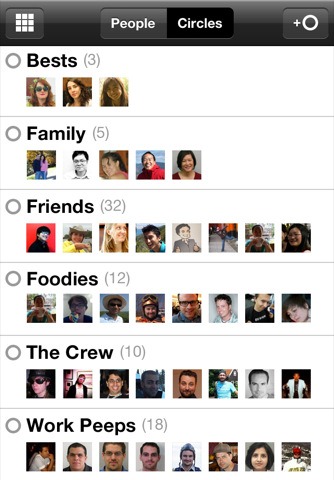
  • +Circles: similarly to the desktop version, this features allows for effortless contact management by allowing "friends" to be sorted into different groups which can then have different permissions assigned to them. This way, users will be able to choose exactly which information to share with which people, much like they do naturally in real life.
  • +Huddle: while the name might not be obvious at first, this feature is as simple as an intuitive way to start group text chats, much like instant messaging today.
Google  for iPhone
Aside from the features above, the mobile Google+ app also enables users to view their stream, with posts made by who they’re following, in real time, as well as effortlessly upload content, namely music and video. Users are also able to "check in" at places using the phone’s location features, similarly to what they can do with competing apps.
Google+
The major downside is the lack of iPad support which is nowhere to be found at the moment. While iPhone apps can be easily scaled up in order to fill the larger screen, this app isn’t designed to take advantage of the iPad’s larger resolution.
If you’ve been following the news over the last few months, you’re probably aware of Google+, Google’s new endeavor in the social networking space. While most feel that the service doesn’t include innovative features, many argue that they’re implemented a lot more elegantly than they are on competing services such as Facebook. Even though the service is currently invite-only, therefore only limited to a selected range of users, 10 million had already signed up for the service as of last week, according to a statement by the company at the time.
Download the Google+ app for iPhone today from the iOS App Store.
Make sure you check out our iPhone Apps Gallery and iPad Apps Gallery to explore more apps for your iPhone and iPad.
(via MacStories)
"
read more

The First-Ever Antivirus And Malware Scanner For iPhone, iPad Is Now Available, And It’s Called VirusBarrier

"
Apple has always been a fairly malware-safe world, aside from an occasional threat that pops up every so often. While malware incidence has indeed been low on both Mac and iOS, Mac OS X anti-malware maker Intego, has developed a new malware scanner for iOS devices.
VirusBarrier
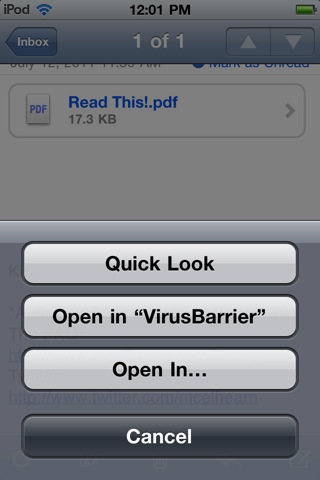
VirusBarrier, as this new tool is called, will scan places where malware is the likeliest to be stored at, such as the user’s Dropbox folder, as well as Mail attachments and other locations within iOS that are directly exposed to users. This tool is an on-demand scanner, meaning that it doesn’t run in the background due to the nature of iOS’ multi-tasking (or lack thereof), therefore users will have to manually scan files from the app itself or by pressing and holding the link to any file and selecting "Open in VirusBarrier".
VirusBarrier
You may now be wondering about the need for an anti-malware application on an iOS device, since after all no software that hasn’t been reviewed by Apple can run on the system (unless you’ve jailbroken it, of course). It turns out that the main goal of this app is to stop infected files from ending up on more vulnerable systems, as explained by the company in a press release:
While there is no known malware for iOS, files can flow through these devices into computers at home and at work by e-mail, or via remote locations such as MobileMe or Dropbox. Mac and Windows viruses, malware and worms will take any path they can to get into home and work computers, and can easily be passed on to friends and co-workers directly from an iOS device, even though they do not affect iOS devices.
VirusBarrier is, of course, equipped to detect Windows, Mac and Unix viruses, therefore expect its virus definitions to be updated quite often. VirusBarrier can be downloaded from the iOS App Store for $2.99, which will grant you free detection updates for a year. From that point, you’ll have to purchase a license again for an additional $1.99 every year.
VirusBarrier for iPad
Whether this app is worth the investment is up to you. Common sense is usually enough to keep malware out most of the time, but there’s nothing wrong with wanting a second layer of protection.
(read the whole press release here)
Check out our iPhone Apps Gallery and iPad Apps Gallery to explore more apps for your iPhone, iPad and iPod touch.
(via iPhoneItalia)
You can follow us on Twitter or join our Facebook fanpage to keep yourself updated on all the latest from Microsoft, Google and Apple.
"
read more

20 Useful iPhone Apps for Developers & Designers

"
One of the greatest reason why iPhone, apart from its amazing features and aesthetic design became so popular is because of the vast number of applications iTunes store has to offer. Even for web workers like designers and developers who rely heavily on computers and laptops, there are tonnes of interesting applications that may come in handy in your iPhone.
iphone app for designers developers 20 Useful iPhone Apps for Developers & Designers
If you have some time to kill and feeling a little adventurous, how about checking out these interesting iPhone apps for designers and developers we’ve compiled? From database app for developers to color apps for designers and some apps suitable for both, here’s 20 Fresh iPhone apps for Designers and Developers. Full list after jump.

Web Developers

Database Viewer Plus

Database Viewer Plus allows users to open up their Windows-created database on their iPhone, and create tables, queries and even forms for them right on the iPhone. Not only that, it has the capabilities to sync with complex database software like Oracle, SQL Server, etc.
A web developer can use this application to easily transport and even edit any database he is working on for any application or software.
You would need to download their desktop software also, which in turn would allow you to access the database files on your computer from any place or location as long as you are near to a Wi-Fi router or internet connection.
database viewer plus 20 Useful iPhone Apps for Developers & Designers

Network Utility

Network Utility is an application suited well for server needs. It allows users to check on their website domain server status to ensure that it is still working. You can easily ping your website server from any location, without being in front of the screen every time! Now, checking your website status is just a tap away.
You can also have a look at your IP address information extracted from the website address, for sure there is no private or confidential data that can be seen.
network utility 20 Useful iPhone Apps for Developers & Designers

Analytics App

As the name of the application suggests, it’s all about analysis. The user is given easy access to Google Analytics comfortably from their iOS device. Users can easily look at the Google Analytics’ statistics of their own website, allowing them to be more productive and make their website more effective in its own services.
analytics app 20 Useful iPhone Apps for Developers & Designers

PHP Cheat Sheet

It does not matter if you are professional web developer or an uprising developer, or maybe you just wanted to have a peek inside the field. Well, this PHP cheat sheet is definitely good for everyone in and outside the field, regardless of their experience.
If you are encountering any problem during the PHP phase of your project, and want to have a look at a few commands and PHP syntax, this app will provide you the information with example in the blink of an eye, so that you have an idea of how it works.
php cheat sheet 20 Useful iPhone Apps for Developers & Designers

RegEX Cheat Sheet

This application goes a notch above your regular cheat sheet. Not only does the user has the permission to look at few commands and syntaxes, the web developer can also test them inside the app, and even test other self-created syntaxes to see if they would function as what they expected.
The application serves as a library to many vital cheat sheets, including cheat sheets for famous language like PERL, Java, PHP, Python, and more.
regex cheat sheet 20 Useful iPhone Apps for Developers & Designers

Python Cheat Sheet

The Python cheat sheet is nothing less than a cheat sheet for the popular computer language, Python. Forgetting syntax is a time of the past now my friends, with this application you can easily refresh your memory of those commands or see what Python can do with a glimpse at these amazing commands that make up the whole language.
The application works offline as well, so you can study them on-the-go.
python cheat sheet 20 Useful iPhone Apps for Developers & Designers

Developers Tool Kit

This is a simple toolkit that will come in handy especially when you are coding a website, or any software. You are provided with the Unicode or UTF-8 character code for any symbol you want. A simple, yet helpful built-in calculator allows for calculations to be made at a fast pace unlike any other calculator!
developers tool kit 20 Useful iPhone Apps for Developers & Designers

StoreIT

StoreIT is another database creator for the iOS device which allows a database to be stored and carried out, with the ability to edit the database.
This application also gives a few more complex features for users, which include the ability to password protect specific category that may contain confidential and private data (address, contact number, email id, etc).
There are a few built-in themes and templates ready inside the application for you to get started with. However, if you don’t like them or they don’t suit your need, you can always create a new one.
storeit pro 20 Useful iPhone Apps for Developers & Designers

ServersMan

This application allows your iPhone to be converted into a small, portable flash drive. You can store your data into it and take it with you wherever you want to go.
Really good for people on the move, or for those people who do not want to spend more money on just getting a flash drive yet need to get their work transferred from their homes to their work office PC.
serversman 20 Useful iPhone Apps for Developers & Designers

Web Designers

CliqCliq Colors

The Internet is boring without colors, but then again it really is an eye killer if your eyes are bombarded with a million of rainbow colors at the same time. That is exactly why web designers need to choose the most effective color for their project, which will not only attract the peers to the website, but less disturbing at the same time.
When a web designer is working with CSS, HTML, Flash or any other language, he will spend quite some time searching for that perfect color. Cliqcliq Colors allows the designer to create a color palette according to the need of the user, then provides HEX code which the user can easily utilize it into the coding.
cliqcliq colors 20 Useful iPhone Apps for Developers & Designers

Color Expert

Color Expert is another color extraction and production application. Just like the Cliqcliq Colors, the application provides HEX codes of the color that the user has chosen. The user can also choose to pick the color out from a photograph or image that is stored in the photo albums in iOS storage.
Apart from the default colors, you can also check out the color palettes of PANTONE solid coated, solid uncoated, PANTONE goe coated, uncoated, HTML, Web Safe colors and even the library for Lab and CMYK colors.
color expert 20 Useful iPhone Apps for Developers & Designers

Ruler

There are a few things a designer cannot live without, which are brushes, paint and ruler. Ruler allows your iPhone to be converted into a portable ruler that is more accurate than your typical hand.
The measurement is very precise so I don’t think you’ll need to worry about carrying a ruler again, especially when you got one in your iPhone, or any other iOS device.
rulers 20 Useful iPhone Apps for Developers & Designers

The Typography Manual

Text is the second best thing a user looks at when surfing the web. If a website has a good set of colors but not a very good typography, it would reduce readability, thus reducing site traffic.
The Typography Manual is for every designer. It teaches the designer the every bit about typography and what makes the text looks readable, crisp and attractive.
the typography manual 20 Useful iPhone Apps for Developers & Designers

Web Design In a NutShell

This is one amazing book that lets you read on the new concepts introduced in the web design, such as the introduction of HTML 4.01 and new XHTML concepts. This is a ‘must’ read as you really don’t want to create a website with old school design and also code that are not compatible with major browsers.
The book also tells you of how you can make your website more efficient and this is exactly where the role of a designer comes in.
web design in a nutshell 20 Useful iPhone Apps for Developers & Designers

Designers HQ

The application is a mobile version of a small forum, or community called “Designer HQ” where the user can find loads of information regarding design, tutorials, tips, tricks and free stuff for use in their design.
The application takes content from many major web design site, Smashing Magazine for example is the one of many others.
designers hq 20 Useful iPhone Apps for Developers & Designers

Sketches

This is an amazing app for designers who really need to sketch something fast in the most precise manner. A sketch has to be made quickly before it is forgotten in the most precise manner so that it may be understood later on when needed.
Sketches allow the user to do this as it provides the user with features that are unmatchable by any other application for iPhone. Features like clip-art, artistic brushes, and shapes make sketching really lightning fast!
sketches 20 Useful iPhone Apps for Developers & Designers

WhatTheFont

Have you come across a font that you don’t recognize, or a font that you want to use on your next design but can’t get to know the name of it? Well then, WhatTheFont can help you recognize the font by tapping a photo of the font through the native iPhone camera, which the application will then process and display fonts that match it the most!
The fonts are searched from the directory of MyFonts, so you can hope to find the font soon since their library hosts the world’s biggest font collection.
whatthefont 20 Useful iPhone Apps for Developers & Designers

A bit of both:

Here are some apps that go along with both occupations – whether you are a web designer, or a web developer, it doesn’t matter. These apps are something that will help both careers in a way that will really boost your work productivity.

Full Browser

This application is something simpler and more user friendly than the native Safari browser. As the name suggests, it allows the users to surf the internet on a full screen mode, without any tab or address bar blocking your view.
Full surfing experience can be achieved by this app – really good for web designers who want to look at the design of the entire website, or for web developers who may need to see how a design looks so that they can code it that way.
full browser 20 Useful iPhone Apps for Developers & Designers

ACTPrinter

ACT Printer is a really good app especially if you are being environmentally friendly, which means you don’t want to waste any more paper. The application allows the paper to be printed into the iPhone instead of a printer.
When a user is printing a document, he can choose the option to ‘Print to iPhone’ which will cause the document to be soft-printed onto the iPhone instead. This also makes your work more secure!
actprinter 20 Useful iPhone Apps for Developers & Designers

Action Method

Action Method is an application that allows you to create tasks by projects so that your work proceeds in a mannerly and organized fashion.
This application is a must-have for every web developer and web designer that has undertaken an assignment from a client and needs to finish things before a deadline. This app will allow the user to break their tasks into different, smaller and less stressful tasks allowing the developer or designer to work more freely and finish the work before the deadline.
action method 20 Useful iPhone Apps for Developers & Designers
"
read more

Trip Journal: Document Your Journey

"
Some of you will remember the time before the Internet and smartphones. Back when there was no GPS, you had just a plain old map to coordinate your trip. You planned ahead, you marked your stations by drawing them with a pencil and you probably sat for hours afterwards to match photos to a certain stop.
Thanks to the wonders of GPS, the iPhone and some really ingenious programmers, you can now use one app to track your entire journey, complete with live positioning, photos and notes. Meet Trip Journal, a travel diary for the iPhone.

What it is and what it isn’t

It’s important to understand right away what Trip Journal is and what it isn’t so you wont be disappointed: Trip Journal is not made to plan ahead, it’s made to track your movement (either live or when you chose to mark yourself at a place). It allows you to take and store photos and notes together with check-ins and it allows you to export the entire trip to various other sites. Think of Trip Journal as a travel diary.
If you are looking for an app that allows you to plan your trip – selecting noteworthy places to visit, hotels to sleep in and bars to hang out with friends – you better take a look at the excellent Itinerary which we reviewed earlier.

How to record a trip

Trip Journal greets you with a wonderful old-style interface reminding you of an old and faded map which makes you feel a little like Indiana Jones. Assuming you are at the beginning of your journey, start a new trip and enter the necessary information.
Create a new trip
Create a new trip
There are two options of how to track your trip: you can either check in via GPS at various locations, or you can have Trip Journal keep continuous track of your movements. The latter option is more battery consuming, since the app needs to fetch data all the time, but I wish I had discovered that option while being in Rome — due to all the excitement during a trip, its so easy to simply forget to check in. To enable continuous tracking, just tap the paw icon in the lower part of the screen.
Trip Journal can be used SAFELY outside of your own country. It only uses the GPS module, which does not require an active internet connection and thereby keeps your phone bill safe.
Activate continuous tracking
To single out certain points of interest, you should create a waypoint when you are there. To do that, simply tap the flag icon, wait until your position is calculated and then name the waypoint. You can create these at a later date as well if you forgot, but they won’t be in chronological order.
For every waypoint, you can add photos and notes, which will then be displayed when you select the detail view of a waypoint. It’s an amazingly easy way to track your experiences, especially since you can add photos and notes for as long as you’re on the trip. So if you only checked in at, say, the St. Peters Cathedral in Rome, you can add your photos and impressions at night when you’re back in your hotel room. You can take images from within the app itself, or, if you prefer another app for taking photos, you can import them from the camera roll.
Detailed view of waypoint information
At any given time during your trip, you can hit Trip View, the large map in the middle of your screen, to see literally everything: all your waypoints, media and the trip route on a map.
Detailed view of the entire trip with all separate waypoints
Detailed view of entire trip on map and statistics

Where to go from here?

So now that you have finished your trip, you need to end it, just make sure that you’ve added all your media by then. While you can add comments to photos later on as well, you can’t add photos without reopening your trip (which might mess up your statistics like when the trip ended and such).
Of course, Trip Journal is about being social and so you can export your entire trip to Facebook, for which there is a separate free app. It displays your trip data in a gorgeous interface, allowing you and your friends to browse your media and look at your waypoints and the associated information.
View of exported trip on Facebook
Once you’ve published your trip, you can also embed it on popular sites like WordPress, Blogger, Typepad, Squarespace, Tumblr and Posterous. The code necessary is generated by the Facebook app and only needs to be copied and pasted into your own blog.
Wait, there’s more! There are six more ways to share your trip, including Google Earth, GPX, Flickr and Picasa. Recently, Trip Journal for iPhone received the complimentary viewing app for iPad, called Trip Viewer. It allows you to view your entire trip on the bigger display. Just export your iPhone data via the iTunes button, save it from the “Apps” dialog in iTunes and then drag it into the Trip Viewer app when you connect your iPad to iTunes.
View trip in Trip Viewer for iPad
Play trip and enjoy the animated balloon :)

Verdict

I’ve been a Trip Journal user for a long time and I’m still finding out new stuff about it (if you want to speed up the process, take a look at the great introductory presentation). The app makes tracking your trip extremely easy, even though there are aspects which need improvement, like being able to add waypoints at a later time, but change the date of the waypoint so it fits into the entire trip. Or changing the start waypoint (including it’s position and time) if you’ve forgotten to set it. Mostly, I wish I could add photos and videos to a trip even after I’ve ended it, without me having to reopen the trip.
But those are details and when looking at the big picture here, Trip Journal does an amazing job of keeping your memorable moments organized and offers an easy way to share those moments with family and friends. I hope that maybe one day it will be possible to export a trip in a printable format like PDF, but for now, the app is already pretty amazing.
How do you keep track of your trip and the memories that go with it? Let us know in the comments!
"
read more

iPhone Game Friday: New Releases

iPhone Game Friday: New Releases: "
Welcome back to Game Friday!

This week brought us some truly fantastic games and we’re very eager to show them to you. Everything from blockbuster action to retro platforming lies after the jump, so click through and have a look. You know you want to.


BackStab
BackStab


BackStab


As is always the case with larger-scale adventures on any platform, it’s difficult to do them critical justice in a couple of paragraphs, but it’s room enough to give an overview. In the case of BackStab, Gameloft’s latest outing, the conclusion is clearly that they’re getting very good at making extremely impressive, console-like games that fit in the palm of your hand.

Fighting for revenge as a wronged officer of the Royal Navy, you take control of Henry Blake and make your way through an impressive story spanning across four cities and vast swathes of jungle, beach and volcano environments in a well realized virtual Caribbean. There’s a good blend of combat and platforming, most of which controls impeccably, and you’ll likely be reminded of a historical Uncharted or Tomb Raider as you play. The combat system is worth mentioning because there is a fairly robust combo mechanism that you can use to string together awesome moves. Or, if you’re the quiet type, stealth kills are also satisfying.

While it goes without saying that the visuals are impressive, it’s worth giving a nod to the audio as well, where the voice work really shines (too bad the models don’t move their mouths, though). So long as you’ve got a relatively recent iOS device and love adventure, BackStab is a no-brainer.

Price: $6.99

Developer: Gameloft

Download: App Store


Tiny Tower
Tiny Tower


Tiny Tower


Making a strong entry into the “freemium” world, Tiny Tower offers the chance to build a tower and develop the businesses that open up inside.

Earning money lets you build new floors and attract various “bitizens” to open up shop in your tower or live there. There’s a good deal of customizability in terms of the look of your tower’s floors, the order they appear in and the way that the inhabitants appear, so what could have been a dull game of stacking fast-food joints turns out to be a brilliantly polished, engaging and addictive skyscraper simulator. This is Game Dev Story meets SimCity on your iPhone.

There is some solid social integration as well via GameCenter, and within the game you’ll find an amusing virtual social network called “BitBook” wherein you can monitor the social moods of your tower’s inhabitants. From its vibrantly colourful 8-bit graphics to its smooth and straight-forward gameplay, Tiny Tower is pixel perfect and well worth playing.

Price: Free

Developer: NimbleBit

Download: App Store


Continuity 2: The Continuation


Continuity 2: The Continuation


Having won last year’s Best Student Game award, the developers of the first Continuity (which was a web game) decided it was time to up the ante and bring their amazingly clever game concept to the next level. The result is Continuity 2: The Continuation, and fans of the original will be thrilled to hear that it’s everything they could have hoped for — and it’s on their iPhone!

Continuity’s major claim to fame is a unique puzzle mechanic that’s both mind-bending and deceptively simplistic. Each level is made up of several tiles, and your goal in each level is to slide the tiles around so that your character can pick up a key and unlock the door at the end. This becomes increasingly more difficult as the number of tiles and the complexity of their arrangement increases.

There’s a lot to keep you busy in here, including 50 brand new levels, and given the success of their first game, there’s little doubt that we’ll be seeing more level packs and other updates for Continuity 2 in the near future. We can’t wait!

Price: $0.99

Developer: Ragtime Games LLC

Download: App Store


1-bit Ninja
1-bit Ninja


1-bit Ninja


In what must be one of the most interesting mash-ups of gameplay styles and visual aesthetics in recent memory, 1-bit Ninja brings together Mario-style platforming, endless running games, 8-bit graphics and a fully 3D perspective system with unlockable perspectives (including the very cool anaglyph mode).

While it sounds like it could be cluttered, the game is the essence of elegant simplicity. The controls are well-thought-out and designed for touch, so you can stop worrying about fiddly controls and focus on overcoming the game’s seriously unforgiving difficulty level. And make no mistake, this game is hard and proud of it. There’s also no going backward (without using a spring) so it sets itself apart from the standard platformer with a sense of linearity.

There are currently four worlds to traverse and a bunch of cute secrets to find if you’re the pixel peeping type. One fun feature is the replay mode, where you can save your best runs and then re-watch them from the main menu. With more levels on the way, 1-bit Ninja is an easy recommendation for fans of challenging and extremely polished platformers that bring something new to an old formula.

Price: $1.99

Developer: kode80 LLC

Download: App Store


Monster Soup
Monster Soup


Monster Soup


Last and certainly not least is Monster Soup, a colourful new title from the great Kieffer Bros., who brought us such iOS classics as Aqueduct. Their newest offering is an adorable story about the Soup System and its resident monsters, who are having some trouble with the evil Plubert.

Plubert is threatening to freeze the monsters and your job is to save them by drawing lines to connect like-coloured monsters in each level. The longer the chain, the more points you get and the more power-ups you can call upon. The game is very accessible and its charming presentation means that it’s easy to get hooked. The fact that you can use a two finger upward swipe to speed up gameplay makes it perfect for more hardcore gamers too, who are looking for a faster pace.

As one expects from the Kieffer Bros., the visuals are polished and run smoothly even on older devices, and the attention to detail is very clear. The monsters may be a bit small for those with larger fingers to successfully maneuver around, but it’s not a significant issue since the controls are very responsive and forgiving. Go save some monsters!

Price: $0.99

Developer: Kieffer Bros.

Download: App Store


What Have You Been Playing?


If you can peel yourself away from these gems, then toss us a comment and let us know what else you’ve been playing in case we missed any winners!
"
read more