• Feed RSS
Showing posts with label Web Application. Show all posts

7 Cool Web Apps You Might Not Know About (But Should)

"There are many websites and web applications out there, but getting by free and good ones is not that easy. Today, we are sharing 7 Cool Web Apps You Might Not Know About (But Should). Read each entry in the list and see which web application suits your needs best.
You are welcome if you want to share more unique search engine that our readers/viewers may like. Do you want to be the first one to know the latest happenings at SmashingApps.com, just subscribe to our rss feed and you can follow us on twitter and follow us on Digg as well to get updated.

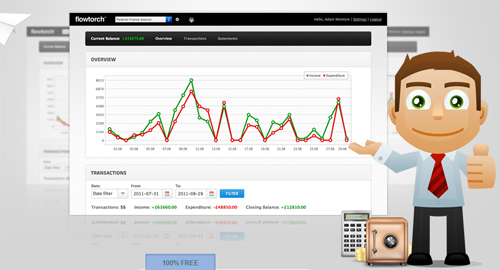
Flowtorch


FlowTorch is a free to use, simple and powerful financial management tool for personal, freelance and small business use.

Moably


You can create your free mobile website in minutes with Moably. It works seamlessly on the iPhone, Android, BalckBerry, and the majority of other major mobile operating systems.

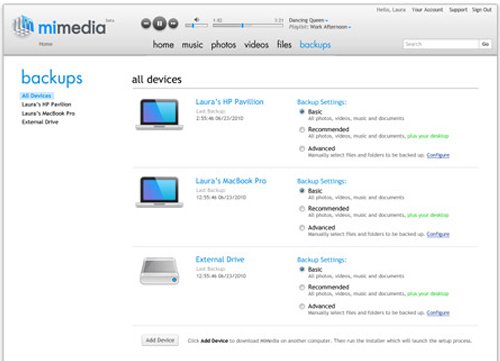
MiMedia


MiMedia will back up and protect your files in a secure online storage account. Beyond online backup, MiMedia also provides instant on demand access to your files from anywhere. With MiMedia, you can view any of your photo galleries, access your other files all in one user friendly location etc.

Countdown Timer


This online countdown timer is meant to be as easy to use as a regular kitchen timer. It is equally simple: all that you have to do to set it is to rotate the dial and point the red arrow at the desired number.

Picfull


This is a very basic free one click photo editing online application. This is really good for those who want little effects to implement on their photos.

LiveMinutes


LiveMinutes allows you to do free web conferencing to share and work on the document at the same time with your colleagues, friends etc

JobSpice


JobSpice is a resume builder that can help you quickly design and share a professional resume."
read more

Hottest Web Applications of the Month – July

"
Here we are again! In this particular month, we will like to share to you a whole bunch of great web apps that will improve your workflow in all sorts of different ways from online video editing to rapid prototyping, learning Ruby on Rails and more – you name it, we’ve got it.
hottest app july 2011 Hottest Web Applications of the Month – July
Of course, if you’ve got a great app you think we should include on this list you can suggest them by commenting below, or sending us a tweet @Hongkiat using the tag #hkwebapp. We’d love your feedback on the types of apps you’d like to see, and your favorite apps.

Tomorrow

Tomorrow is a very neat and nicely designed to-do app. It keeps the interface very simple by offering you just two options – today or tomorrow. If you can’t get it done today, put it on the tomorrow’s list, and do it the next day.
I’ve been trying out the app for a few weeks now, and I found the “deliberately” limited option really helps me focus on the task in hand. The app also has iPhone, iPad and Android app available, so you can get your to-do list wherever you are. Well worth a look for the to-do junkies out there.
tomorrow Hottest Web Applications of the Month – July

InVision

InVision is an extremely useful tool for designers and developers that helps you to build up real working interactive prototypes in no time. All you need to do is upload your wireframes or designs, set up some links, and then you can run clients or users through your designs.
By testing your designs in this way and letting clients make changes earlier, you can invest more time on making great and functional sites, while avoiding the issue that the client wasn’t quite sure what they are looking for. Watch the screencast and you’ll be sold.
invision Hottest Web Applications of the Month – July

Sync.in

Aside from its pretty look, Sync.in is a great way to collaborate on different documents in real time, so you and everyone else you are working with the document can see changes reflected as you edit them.
If you’ve ever been working on a pitch, plan or anything else with multiple people, even in the same location, you’ll appreciate how simple and painless Sync.in operates document collaboration.
sync Hottest Web Applications of the Month – July

JayCut

JayCut is a surprisingly powerful online video editing tool which brings video editing to your browser.
I’ve been playing with the tool for a while now, and have found it fast, responsive and full of functionality. If you’ve got a slow computer, you move around a lot, or you don’t have access to other more expensive tools, JayCut is really something you should check out.
Most remarkably, the interface is really easy to use and understand compared to most desktop video editing apps, and you can access it all from your browser window.
jaycut Hottest Web Applications of the Month – July

Rails For Zombies

Rails for Zombies is an extremely well produced site for anyone who is interested in learning more about Ruby on Rails. It has a number of different lessons that teach you the basics in a new and interesting way.
One of the best things about it are the screencasts for each module which keep your interested while teaching you how to program. There’s also a very helpful PDF for each module to help to ensure you’ve got all the important information down pat.
zombies Hottest Web Applications of the Month – July

Wetransfer

Wetransfer is one of the most interesting file sharing sites I’ve seen for a while. They allow you to upload up to 2GB per file, and it’s free so no registration is required.
Unlike other file sharing sites I’ve seen though, they’ve also got a really different business model – behind the page where you share the files, they have fantastically designed full screen advertisements. None of the advertisements are in your face, and every time I go back to the site, I actually feel like clicking through to see just what the ads are for. It’s pretty neat. (Suggested by Danny)
wetransfer Hottest Web Applications of the Month – July

StrawberryJ.am

StrawberryJ.am is a neat new web app that helps you sort through the junk in your Twitter stream (with Facebook support coming soon) to see the stories you’ll actually be interested in looking at.
Anyone who follows a lot of people on Twitter will appreciate that it’s a very difficult to task to find the links that are actually worth looking at; StrawberryJ.am takes care of this for you so you spend less time looking at crap, and more time enjoying the good stuff. It’s currently in closed beta, but you can sign up for an invite from the home page.
strawberryjam Hottest Web Applications of the Month – July

Aviary Music Creator

Aviary has a collection of really interesting tools, and among them all I found one very enjoyable to play with: Roc.
Roc is really a fun and interesting way to create music. There are 50 free instruments available, and you can mix and match to make all sorts of fascinating musical creations. You can also share and collaborate on different tracks, and it’s lightning fast to boot. For the musical guys among us, this one is definitely worth a look.
roc Hottest Web Applications of the Month – July

Feedly

Feedly is a very beautiful tool for following your favorite sites and finding new ones.
There are a bunch of different categories you can sign up to follow, as well as a huge range of popular sites. You can neatly divide all the different topics you are interested in, and get suggestions for other sites you might be interested to follow.
feedly Hottest Web Applications of the Month – July

Historious

Historious is a great way for managing bookmarks that you otherwise wouldn’t find again, and has lots of helpful features too.
You can bookmark in just one click. You can tag your bookmarks, share your bookmarks with whoever you like. They also take a snapshot of the sites you bookmarked so even if they change in the future, you can view them as they were when you first found them.
Best of all is it has full text search for all your bookmarks, so you don’t need to remember the headline, just input any information from the post. It’s like Google for you bookmarks.
historious Hottest Web Applications of the Month – July

Switchr

If you’ve ever needed to convert audio files then Switchr is the site for you.
All you need to do is to select your file, the format you’d like to change and enter your email address. There is such a confusing array of audio file converter out there so having an easy tool like Switchr is really a lifesaver. It’s free too, so keep it in mind next time you need to play with audio. (Suggested by Ameer)
switchr Hottest Web Applications of the Month – July

OhLife

OhLife is a journal for the modern age. Rather than opening up a diary or any other application, you simply get an email every day asking how your day went. All you need to do is reply to that email, and your thoughts will be saved for you.
I really like this app because it fits in with my workflow so nicely. I’m always on email anyway, so a quick reply to OhLife is very quick and painless, and a great way to reflect on everything you’ve been up to.
ohlife Hottest Web Applications of the Month – July

Conceptboard

Conceptboard is another great web app for online teamwork and collaboration.
Among many features, you can draw directly on a board for your team to see, drag files directly on to your concept boards, write over your documents, leave comments easily for others to see, invite colleagues and clients to participate and even work on it using your iPad. The free account gives you a lot of options and is worth a look. (Suggested by Roman)
conceptboard Hottest Web Applications of the Month – July

That’s all for The Month

That’s all for this month, same time next month :-)
Be sure to subscribe to our Newsletter or RSS feed to keep up with all the latest and greatest web apps, and all the other great content we offer.

Suggest An App!

This is going to be a monthly feature from now on, so if you have any great app you’d like to suggest for our next month’s round-up, here’s what you can do:
"
read more

First Look at the New iCloud Web Apps

"
Apple just recently opened the floodgates to their new iCloud web apps, and in short, they’re easily some of the most impressive web apps online today. There was initially some speculation as to whether Apple was going to continue the tradition of MobileMe’s web apps and let you use iCloud online, or if they were going to only make iCloud work with OS X Lion and iOS 5 apps. The good thing is, there are iCloud web apps for sure, and they’re great. Unfortunately, they’re not quite ready for public consumption.
Dying to see what the new apps are going to look like, assuming nothing changed between now and when they’re fully released? If you’ve got an iCloud developer account, head over to iCloud.com, login, and check them out for yourself. We’ll wait. For everyone else, here’s a quick preview of what you can expect when

The iCloud Saga

A couple hours ago, after arriving back home from a trip, I saw online that the new iCloud web apps were ready for action, at least for some. I quickly went to iCloud.com in Safari on my iPad, only to be greeted by a message telling me that it was coming soon, or I could try the web apps on a Mac or PC. Nice. So, I booted up my netbook, opened Chrome, browsed to iCloud.com, and logged in with my standard Apple account. Of all amazing things, it worked. I’m in the habit of taking screenshots of almost everything new I do on the computer, and it worked out good this time, as only minutes later, it said I couldn’t login since I don’t have an iCloud Developer account.
With that short peek, though, I’m more excited than ever to get my hands on the final version of the iCloud web apps. They’re easily some of the most impressive web apps online right now, and they’re still in beta. The amazing thing is that they actually feel like real native apps, or more accurately, native iPad apps. The only web app I’ve ever used that came this close to feeling like a native app is Flow, and it’s close enough that people have assumed it was a native Mac app instead of a web app. The iCloud apps take it to the next level, complete with iOS-style notifications. They’re still powered by SproutCore, at least in part, which makes me think that more web apps should take advantage of it.

Apparently, you've got to have a golden ticket
So, when you first login to iCloud.com, you’ll sign in with your Apple ID, and then will be asked to add a bit more info. You can upload a picture directly by clicking the Add Photo box, and then scale it to size right in the iOS-style popover. No Flash needed for the upload, but that’s to be assumed from Apple. You might notice that Apple’s new love for linen textures has been brought over to iCloud.com. This time, it looks almost more like a blue corduroy background.

Image uploading without Flash. Now, we need flash-less webcam support.
Each part of the app has been intricately designed, and is incredibly responsive for a web app. The design is strongly influenced by the iPad. The popovers, delete buttons, menus, and more feel like they’re running on an iPad. So much so, in fact, that I instinctively reached out and touched my netbook screen without thinking to close a notifications popover. Sadly, iCloud doesn’t magically turn standard LCD screens into multitouch displays.

The web could use more apps with this much style
Once you’ve added your picture, language, and time zone, you’ll be brought to the launchpad style app view. iCloud has 5 major apps right now: Mail, Contacts, Calendar, Find my iPhone (or iPod Touch or iPad), and iWork. When I tried to open Mail, it said I needed to create a new account from an iOS 5 or OS X Lion device first. Since that wasn’t an option, I tried to open Find my iPhone since I’ve used it on my iPad before. Turns out, it’s still located at me.com for now.

iOS style notifications exist throughout the iCloud web apps
The iWork apps turn out to simply be landing pages to let you know more about Keynote, Pages, and Numbers for iPad. I’ve used these apps on my iPad, and shared documents with Apple’s existing iWork.com service already, but you can’t use these web apps right now without iOS 5. Surely they’ll let you bring existing iWork.com documents into iCloud once it’s released, but it’s not there yet.
One interesting thing you can notice is that there’s a OS X Lion style disappearing scrollbar on the right of the page. Additionally, there’s a cloud icon in the top left of all of the iCloud apps so you can quickly get back to the launch screen.

iCloud isn't bringing in iWork.com documents ... at least not yet
It wouldn’t have been too surprising if all of the apps had turned out to be landing pages, but instead, the full contacts and calendar experience were running. Contacts looks identical to the contacts app on the iPad and in OS X Lion, down to the bookmark on the top and the background book cover. You can add new contacts, organize them into groups, and tweak a few layout settings. Contacts include all the options that Apple’s other contact apps include, letting you save a wide range of info about the people you need to get in touch with. The popover settings pane was easily the nicest designed web app settings pane I’ve seen, though it did feel odd to see OS X style menus in Chrome on a PC.

It looks so much like an iOS app, I without thinking touched my netbook screen to close a dialog!
The Calendar app again looked just like Calendar in OS X Lion, down to the torn paper on the top of the calendar. Many designers have complained about the odd level of fake realism in both of these apps in Lion, and for better or worse, the exact same design has been brought to the web in iCloud. That said, it’s downright impressive to see this nice of a design in a web app, and it was especially impressive to see how nicely it performed. Many richer web apps can run slowly in most netbooks, but the iCloud apps felt like they were running native.

This might be the nicest calendar web app yet
iCloud Calendar included all the options you’d expect, including repeating events, reminders, notes, and more. It also included all of the standard calendar views, including the nice Day view that looks like a classic dayplanner. I think you should have been able to download an iCal file to subscribe to the calendar from the last toolbar button, but I didn’t think to try it out. At any rate, the interface was amazingly similar to Calendar on iPad or OS X Lion, and was so smooth you could easily forget you were using a web app. In fact, take your browser full screen, and it felt like a new OS X Lion fullscreen app. We can’t wait to see more web apps like this.

Date view is very nice, and just like Calendar on iPad

And … that’s all for now

That’s where our journey ends for now. Unlike Google, who left Gmail in beta-limbo for years, Apple tries to make sure it’s products are as polished as they can be before releasing them into the wild. That can definitely be frustrating at times, but as good as iCloud looks, we’re willing to wait. Apple’s web developers have done an amazing job bringing the full native app experience to the web. When we weren’t expecting full iCloud web apps, they’ve surpassed what anyone would have imagined.
We can’t wait to get our hands on the iCloud web apps again, and hopefully they’ll be released sooner rather than later. And, we do hope they leave the apps open for everyone, not just iOS and OS X device owners. It seems like it’s almost be a good advertisement for their other products to let everyone use the iCloud apps. Either way, it’s nice to see that Apple, along with the rest of the awesome web app developers in the world, continues to push the envelope of what web apps can do. ‘Tis an exciting time for the web!

"
read more

Top 10 Open Source Project Management Apps for Freelancers

"
Successful freelancers know that time is money. Efficient task and time management are the key factors for freelancers. One freelancer may simultaneously lead several projects, need to communicate with a dozen of clients, and have numerous deadlines to hit. To turn freelance chaos into prioritized work order, there are many project management tools in the getting things done software market.
However, most project management tools are expensive or don’t meet freelance needs. Let’s face the truth: the majority of freelancers are budget-limited, work in small teams with multiple clients located worldwide, or are scattered all over the country. Thus, freelancers want cheap, ideally free, highly customizable project management solutions for efficient team-working.
Let me introduce 10 free, open source project management products that are likely to fit your freelance requirements:

1. Collabtive

Collabtive
Collabtive
Collabtive is a web-based open source project management suite. A quick look inside shows that Collabtive has all the basic features: milestones, task management, time tracking, calendar. Moreover, you can import Basecamp projects and get RSS updates. Laconic, clean interface can be enriched by paid plugins provided by the vendor.

2. GanttProject

GanttProject
GanttProject
GanttProject is a free cross-platform project management tool. If you are a Gantt chart addict, than give a try to GanttProject. You can set milestones, plan resources, measure results, make reports and share projects.

3. phpCollab

phpCollab
phpCollab
phpCollab is a customizable open source team-working solution. You can manage projects, set tasks, view milestones. Launched in 2002, phpCollab stands out for sufficient online collaboration tools such as discussions, notifications, support requests.

4. phpEasyProject


phpEasyProject
phpEasyProject is invented for small teams. Though the interface is incredibly simple and clean, all the basic collaboration features are packed. You can create projects, set up tasks and manage to-do list. Dotproject includes a report export feature and performance statistics. So you can keep track of all current team activity.

5. Project.net

Project.net
Project.net
Project.net describes itself as enterprise-level project management software with open code. You can manage projects, collaborate, and use social sharing tools within your team. To tack projects easier, try project templates and dashboards. Besides, Project.net offers paid services like training or top-priority support so you can migrate to the new project management system smoothly.

6. ]project-open[

]project-open[
project-open
]project-open[ is more than just a project management suite. It claims to cover related business areas like CRM, invoicing and payments. Standing close to ERP software, ]project-open[ performs all basic project management tasks. You can manage projects, assign tasks, generate reports and track overall results.

7. Redmine

Redmine
Redmine
Redmine is a flexible web-platform for project management. Redmine is based on Ruby on Rails framework and has multiple database support: Postgre SQL, SQLite and MySQL. The application is multilingual and available in more than 30 languages. Redmine provides users with Gantt chart, calendar, time tracking features which are essential for project planning.

8. TaskJuggler

TaskJuggler
TaskJuggler
TaskJuggler is project management software for serious project managers as it’s written on the website. No matter how serious you are, TaskHuggler will help you to manage tasks, project files, analyze project performance. The data is presented in dashboards and charts so you can have all info at your hand.

9. Teamlab

Teamlab
Teamlab
Full Disclosure: I work on Teamlab.
Teamlab is a A-grade free project management software. It has 4 modules: project management, business collaboration, documents processing and instant messaging. You can set tasks, milestones, track project activity and generate reports, share bookmarks and wiki pages with your colleagues, keep your teammates up to date with news and even create a poll. Teamlab has a fully featured document management suite. Users can edit, store and share documents right on the corporate portal. Thus you can get rid of Google Docs or Dropbox/Box.net file uploads.

10. WebCollab

WebCollab
WebCollab
WebCollab is online collaboration platform suitable for freelancers. You can make to-do lists, manage tasks via calendar, and manage projects. WeCollab supports social activity. You can post messages in forums or add new contacts or files for further team work.
"
read more

10 Web Apps For A More Seamless Workflow Online

"
When trying to be efficient online there are many factors an App needs to be able to perform. It’s often not enough that they have a slick UI and great features. They need to be built in a way that I can integrate them without too much trouble into my daily workflow without too much disruption.
10 Web Apps For A More Seamless Workflow Online

Web Apps

Here are 10 Apps that make working online a lot easier because of the smart thinking behind the Apps.

Clutter-free to Do Lists

TeuxDeux This is an App I have stumbled across recently. It allows you to create to do lists, which are completely clutter-free. In a fantastic design it is a real charm to work with this App as it is often easy to be overwhelmed by a huge list of to dos.
Workflow Tip: Add to do’s from your phone with the handy iPhone App.
Teux Deux

Screencasts That Couldn't be Simpler

Screenr Screencasts often had a big and time consuming ring to it for me. No more. The browser based tool Screenr allows you to create screencasts in minutes and have them published in a high quality resolution. All your screencasts are displayed with a great overview like a blog landing page.
Workflow Tip: Answer emails with a screencast where appropriate. It’s super simple with Screenr and makes for top notch customer service.
Screenr

Handle Twitter Efficiently and Personally

Buffer Keeping a consistent presence on Twitter can create a powerful impact. With Buffer you can spend a few minutes each day filling up your Buffer with Tweets. They are then posted for you well spaced out over the day.
Workflow Tip: Give it one click on the Buffer icon with the browser extension to add any interesting post you come across during the day.
Buffer

Filesharing with One Click

Let’s Crate This app makes filesharing truly dead simple. You arrive at the page and can simply drag your files into the available box. This happens without signing up or in. You can then go and share the link immediately afterwards.
Workflow Tip: If signing up you can create Crates to store files in different folders. The simplicity of drag and drop remains.
Let's Crate

Only the Best News your Friends Recommend

StrawberryApp The App pulls in tweets and Facebook updates and shows you only the most relevant ones. This means, the most shared content will come up and you don’t have to fiddle with clutter. A very time saving way to read news.
Workflow Tip: The App provides you with a daily update of top stories straight to your inbox you can subscribe to.
Strawberry App

Know More About Your Email Contacts

Rapportive The well known gmail tool Rapportive allows you to find out more about the person sending you an email. Immediately you will see recent updates from Facebook, Twitter or LinkedIn. It is a great way to connect in different places without the hassle of searching.
Workflow Tip: Recently the App added Twitter reply support so that you can retweet or @reply right inside gmail.
Rapportive

Never Get Confused with Time Zones Again

EveryTimeZone The pain of setting up a meeting with someone in a different time zone is something that always nagged me. With EveryTimeZone you will have absolutely no problem finding the matching times. The App displays all existing timezones on one page for you so you can easily find the right time.
Workflow Tip: You can conveniently save fixed times next to the daily real time so you can conveniently plan ahead.
Every Time Zone

How Well is your Website Ranked?

WooRank An all time favourite of mine is WooRank. You simply drop in the URL of any page and in return you will get a report on various statistics of the site, including in-site and off-site SEO as well as site traffic and usability hints.
Workflow Tip: Use WooRank to compare competitors and find similar sites in any given niche with the “similar sites' section.
Woorank

Organise Meetings More Efficiently

Tungle Setting up a meeting online with individuals or a group can often be very time consuming. Dozens of emails sent back and forth with little clarification. By using Tungle you can simply allow others to pick a time in your schedule.
Workflow Tip: You can include Tungle in the popular Rapportive tool, which makes it even easier for your email contacts to see your schedule.
Tungle

A Super Intuitive Calendar

Coolendar Coolendar takes a completely new approach on setting up a schedule inside a calendar. Instead of fiddling with times and dates, they have created a very straightforward syntax where you define 'meeting tomorrow 5 pm' and it automatically sets it into the right slot.
Workflow Tip: It ties in nicely with gmail and allows you to send a reminder in form of a Google Talk bot.
Coolendar

Conclusion

I hope some of these Apps are helpful for you, they help me a great deal to unclutter my life. How about you? Do you like any of the ones mentioned? Are there any Apps you love that save you more time online?

Written by: Leo Widrich
"
read more